Stop Renting Security. Own It.
600+ hardening settings for Windows 11 (x64). One clear interface. One-time €39.00 incl. VAT.
Choose a profile, follow the guided setup and see exactly what changed. NoID Privacy Pro applies documented Microsoft baseline and privacy controls — and backs up every setting before it changes, so you can roll back.
 No subscription
 14-day money-back
 No usage tracking


 What the Press Says
Users who want more performance and privacy for Windows 11 25H2 should take a closer look at NoID Privacy. […] NoID Privacy is also particularly well-suited for power users, enthusiasts, and gamers, as unnecessary system components and services can be disabled and corresponding resources saved.
Sounds promising. I think the idea behind the tool and NexusOne23's commitment are great. […] At best, however, the tool helps to “tame” unmanaged Windows 11 24H2 and 25H2 systems — outside large companies with administrator-managed Group Policy or Intune.
NoID Privacy turns Windows back into an operating system. […] In the end, you have a Windows that no longer "phones home", but does what it's supposed to do again. […] Right after setup, Windows feels noticeably smoother and faster in use. No more ad pop-ups, no constant background connections, and less system load.
Powerful Protection. Beautiful Design.
NoID Privacy Pro brings controls from Microsoft’s security baselines for Windows 11 and current Edge — plus anti-spy privacy controls — into a modern, guided interface built for clarity, control and verifiable results.

Start with a security profile — Quick & Secure, Balanced or High Security — or configure every module individually. One guided setup — just under 10 minutes.

Every decision is explained before anything changes — for example the privacy level: Microsoft Recommended, Strict or Paranoid, each with its trade-offs in plain language.
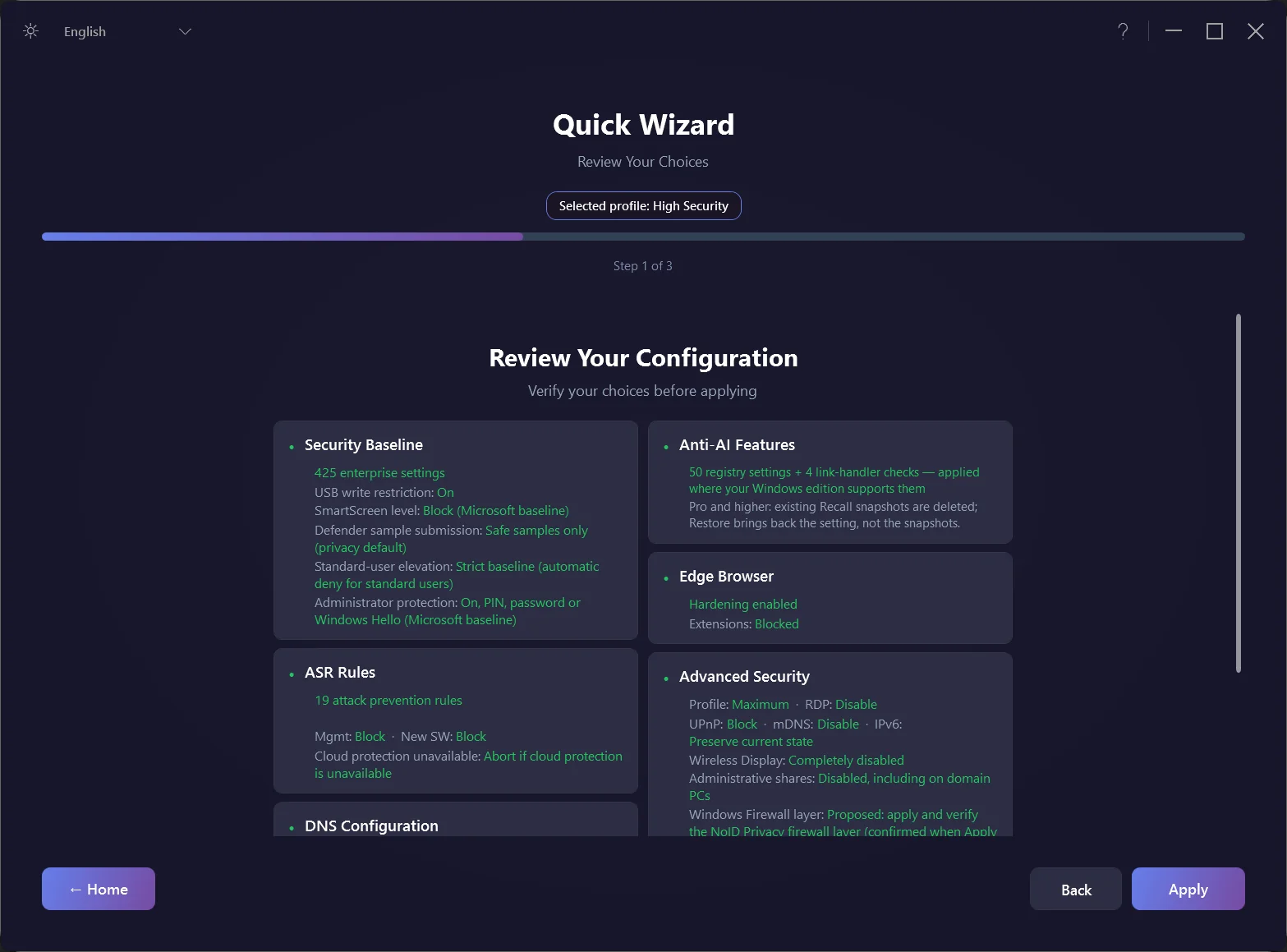
Review every module and decision on one page. Nothing changes until you apply, and every run starts with a sealed local backup.

After the run, every declared target is checked against the live Windows state and reported as passed, failed, excluded by choice or not applicable.

Advanced Mode shows all seven modules and their status. Adjust one module’s options and apply or restore it on its own.

Each Quick Action changes one specific Windows security area. Unrelated module settings stay untouched; every change has its own sealed backup, verification and exact restore.
Verified, Not Promised.
The same Windows 11 Pro installation before and after the High Security profile — straight from NoID Privacy Pro’s verify report.
562 failed (434 mismatched, 128 not proven)
0 failed
Example system: a Windows 11 Pro 26H2 test installation, evaluated from the two built-in verify reports (22 October 2026). Both cards count the same 622 checks the High Security profile requires; before hardening, 128 of them had no saved decision yet and fail as not proven. Of all 711 declared targets, the profile leaves out 35 by choice and 54 do not apply to this system — neither ever counts as passed. View the report excerpts →
 Ready to Harden Your System?
600+ settings. Microsoft security baselines. Documented rollback.
Guided from start to finish — most systems are done in minutes, not hours.
No subscription. No usage tracking. One-time purchase — it's yours.
 Pro Features
Professional security hardening with a beautiful interface — for Windows 11 power users.

1-Click Installation
No PowerShell knowledge required. Professional security hardening in just a few clicks. Visual progress tracking included.

Beautiful Modern GUI
Windows 11 Fluent Design with dark/light mode. Intuitive interface that makes security hardening accessible to everyone.

10 Languages Supported
Fully localized interface in English, German, French, Spanish, Italian, Portuguese, Japanese, Russian, Chinese (Simplified & Traditional). Apply, verification and restore messages and the detailed HTML verification reports appear in your language; setting names, paths and values stay as Windows names them.

Microsoft Security Baselines
Covers 600+ settings, including 335 registry policies, 67 security template settings, 23 audit policies, and 19 ASR rules.

Configuration Backup & Restore
Every applicable configuration target is backed up before it changes. One-click restore covers supported registry, service, firewall and scheduled-task state.

Audit Reports
Detailed configuration reports show the declared target state and every deviation at a glance.

Update System
With an active license, the app can check for updates in the background after startup, at most once every 24 hours. Downloads and installation start only when you choose.

Premium Support
Email support is included — we typically reply within 48 hours on business days.
 Choose Your Security Level
Three presets for different needs — or configure every module yourself.
 Quick & Secure Designed for common Office, browser and gaming workflows
 Balanced
 Can restrict remote administration and network devices
 High Security Test USB workflows and required software before daily use
Before you apply
ASR needs Microsoft Defender as the active primary antivirus with real-time protection. If Defender cloud protection is off, every profile still applies all ASR rules. Microsoft requires cloud protection for three of them. Continuing with limited ASR protection, or explicitly choosing the other modules without ASR, is reported as partial. If Configuration Manager is detected, the PsExec/WMI rule stays in audit mode.
Windows Home skips unsupported RDP and Wireless Display policies. Privacy policies, services and tasks stay unchanged on managed PCs or when management status is unclear. Administrator protection needs a restart and Windows security update KB5127648 (October 2026) or later; earlier updates distributed it only gradually. Without it, the classic Yes/No prompt can remain.
 Tip: Not sure which to choose? Start with Quick & Secure and test your required software. Want full control? Custom Configuration lets you set up each module individually. For supported configuration changes, the exact previous state is saved; removed Store apps use a separate best-effort reinstall.
 Maintained Windows Policies.
Documented Rollback Scope.
Maintained Windows Policies.
Documented Rollback Scope.
We prioritize system stability. We use official Microsoft baselines and policies, but deep hardening can impact some apps. BAVR therefore records the exact previous state of supported registry, service, firewall and scheduled-task settings. Removed Store apps are the documented exception: they are reinstalled on a best-effort basis.
 Built on Microsoft
Security Baselines
Built on Microsoft
Security BaselinesNoID Privacy sets real Windows Group Policies and Security Baseline settings — not random registry hacks. Always review the proposed changes and test on your target system before a wide rollout.
 Protection, Not Obstruction
The recommended Quick & Secure profile prioritizes compatibility, but every environment differs. Review the proposed controls and test printers, games and required software before broad deployment.
 Don't trust us? Audit our code.
The core engine is published under GPLv3. Declared
target settings and verification logic can be inspected in the source.
 The "Undo" Button for Peace of
Mind
The "Undo" Button for Peace of
Mind
Security requires confidence. That's why we built BAVR — Backup, Apply, Verify, Restore.
Backup
Save the exact previous state of every applicable setting before it changes.
Apply
Apply the selected modules and record every applied, skipped and not-applicable target.
Verify
Check every declared target: passed, failed, excluded by choice or not applicable.
Restore
Restore supported settings from their sealed previous state; Store-app reinstall remains separate and best-effort.
One command restores the sealed configuration. Removed Store apps are not covered by BAVR's exact restore; they are reinstalled separately on a best-effort basis.
 Compatibility
Check the target Windows release, required software and legacy devices before applying stricter profiles.
 Windows Release
Windows 11 24H2: fully supported
Windows 11 25H2: fully supported
Windows 11 26H2: fully supported
 Software
Built for everyday apps
Test browsers, Office, VPNs and dev tools
Stricter modes can restrict scripts and child processes
 Legacy Devices
NAS and printer behavior depends on protocols
BAVR restores supported configuration state
Old SMB1 / TLS 1.0 devices
NoID Privacy detects your exact build and edition and automatically skips anything that doesn't apply — no guesswork, nothing breaks silently.
 Security Transparency
How we build trust through transparency


Our philosophy: Security tools should be auditable. That's why our engine is open source — so security researchers, enterprises, and you can verify exactly what happens on your system.
Fair Pricing. Finally.
Rent is for apartments, not security software.
Power User (1 Device)
One-time purchase, incl. VAT
Perpetual license
All updates included
1 license = 1 device
Family (3 Devices)
€33.00 per device, incl. VAT
Perpetual license
All updates included
1 license =
3 devices

Business (5–25 Devices)
€29.80–€23.96 per device, incl. VAT
Perpetual license
All updates included
One license key per package

What Happens After Checkout
Pay securely
Checkout and invoice through Lemon Squeezy, our merchant of record. All prices include VAT.
Get your key
The download link and your personal license key arrive by email.
Install & harden
Run the signed installer, activate once online, pick a profile — most systems are done in minutes.
Requirements: Windows 11 24H2, 25H2 or 26H2 · x64 (AMD64), not ARM64 · administrator rights · internet connection for activation
 The Perpetual License Promise
Buy once → Use it permanently → Receive every update we release

Every valid perpetual license includes all future NoID Privacy Pro updates released for the product, at no additional charge. We provide security updates free of charge for at least five years from purchase.
Free Shell or Pro?
Both run the same open-source hardening engine. Pro adds the Windows app with guided profiles, Quick Actions, visual reports, in-app updates and email support.
| Feature | NoID Privacy Shell (free) | NoID Privacy Pro |
|---|---|---|
| Hardening engine | 600+ targets, 7 modules, BAVR backup & restore | The same open-source engine |
| How you use it | PowerShell menu and scripts | Windows app with Quick Wizard: 3 presets or custom |
| Quick Actions | — | One click per security area, each with its own backup |
| Results | Verification in PowerShell | Visual report in the app |
| Languages | English | 10 languages |
| Updates | From GitHub | In-app update check; you decide when to install |
| Support | GitHub issues | Email, typically within 48 hours on business days |
| Price | €0 · GPLv3 | from €39.00 one-time, incl. VAT |
At home in PowerShell? The free Shell on GitHub is fully functional. Pro is for everyone who wants the same hardening with guidance, visual reports and support — and every purchase funds the open-source engine.
 Already Using O&O ShutUp10++ or DoNotSpy11?
Anti-spy tools reduce what Windows sends to Microsoft. NoID Privacy does that too — and hardens Windows at the same time.

- Switch off telemetry, ads and tracking
- Free, with paid extras
- Some switches turn off Defender's cloud protection
- No Security Baseline, no ASR rules
- Privacy controls for telemetry, ads, Copilot and Recall
- Plus hardening: Security Baseline and ASR rules
- Protection stays on: Defender, SmartScreen, Windows Update
- A report checks every target — and every change can be undone exactly
 Technique-to-Control Mapping
Illustrative attack paths and the Windows controls relevant to them — not live-malware tests or outcome guarantees.

Gootloader Malware
A search-poisoned download can lead from an untrusted script to persistence, command-and-control traffic and later credential access.

Phishing + Macro Attacks
Email attachments with malicious macros remain a major threat, especially in older or misconfigured environments. Still actively exploited.
Credential Theft (Mimikatz)
Tools such as Mimikatz can extract exposed credential material from memory and are used for lateral movement and privilege escalation.
Real threat patterns. Mapped Windows controls.
NoID Privacy configures the Windows controls relevant to these documented attack techniques.
 Read Protection Analysis
 Detection vs. Prevention — the
Layer You're Missing
Detection vs. Prevention — the
Layer You're Missing
Antivirus is the guard at the door — and modern guards are sharp (signatures, heuristics, behavior, cloud reputation). Some attackers adapt payloads and behavior to evade a specific product — though no bypass is guaranteed to work.

- Detects and blocks malicious files and behavior
- Always-on scanning engine with cloud features
- Usually an annual subscription
- Adds privileged third-party code to your system
- Restricts attack techniques, not just known files
- No second scanner — configures Windows' own controls
- One-time €39.00 — no subscription
- Every change backed up and reversible*
Complement, not replacement: NoID Privacy complements Defender or another suitable AV/EDR layer.
 When Built-in Defender May Be Enough
For many home users, Windows Defender and the built-in Windows Security features — properly hardened — can be enough. If you face higher risks, an additional EDR/AV layer may still make sense.
 The Decision
Environment: Home or managed endpoint?
Requirements: Insurance or customer controls?
Choose the security stack that fits the actual risk
Built-in FoundationASR rules can restrict matching behaviors
Windows Update supplies platform updates
Hardening and verification improve the default foundation
 Additional AV/EDR
Also adds: Privileged software and maintenance
Cost and data flows: Vary by provider
Appropriate where the threat model or policy requires it
NoID Privacy activates what Windows already has
No additional always-on AV engine: NoID Privacy primarily configures built-in Windows features. Its GUI and engine remain software that must be maintained, and exact results are verified in the report.
Read Full Antivirus Analysis
Why Hardening Raises the Cost of Attack
Applicable and enforced policies can restrict common techniques and reduce exposed paths.
 Without Selected Policies
Office: Can start child processes
Credentials: Protection depends on edition and defaults
More paths stay open to attackers
With Applicable HardeningOffice: Child processes and executable content blocked
Credentials: Isolated where Credential Guard* is supported
The report records the verified target state
The NumbersVBS: Virtualization-based security
Defense in depth: Multiple independent control families
Every result is verified in the report
Attackers prefer the path of least resistance
Hardening closes the common paths attackers rely on — it won't make you invisible, but it makes you a harder, costlier target.
Read Threat Analysis
 AI Makes Attacks Faster. Hardening Still Works.
The BSI and Microsoft agree: AI mostly speeds up known attacks. The answer is the basics — applied consistently.
- Personalized phishing at scale
- Deepfake calls and video meetings
- Exploits within hours of a patch
- New: prompt injection against AI assistants
- Security Baseline and ASR rules take away what attacks need
- AntiAI turns off Windows AI features you don't use
- Protection stays on: Defender, SmartScreen, Windows Update
- Honest limits: no tool catches every deepfake
NIS2 implementation support for Windows Endpoints
For covered entities, BSI Act §30 requires proportionate technical and organizational measures. NoID Privacy contributes Windows baseline hardening and clearly scoped BAVR configuration documentation; it does not establish compliance on its own.


For covered entities, NIS2 duties are law
Use Microsoft baseline recommendations as one technical layer and document the declared endpoint configuration with BAVR. Risk management, organization-wide controls, and independent review remain separate tasks.
Read the NIS2 implementation guide
 Why "NoID Privacy" when it's
mostly Security?
Why "NoID Privacy" when it's
mostly Security?
"NoID" is short for "No Identifier" — a Windows 11 that stops broadcasting who you are. More than a typical Windows 11 privacy or hardening tool, NoID Privacy applies real security-baseline policies (not one-off toggles) and reports the resulting state, so your settings are reviewable and repeatable — though a Windows update can still call for re-verification.
Security and privacy reinforce each other. Hardening reduces exploitable paths; data-minimizing choices reduce unnecessary exposure.
Security Foundation
33 Edge v151 checks: 24 Microsoft Edge v151 baseline targets + 9 labeled NoID Privacy additions
19 rules: Attack Surface Reduction
VBS + Credential Guard*: Hardware-backed credential isolation when supported and active
Privacy LayerTelemetry: Applicable policies, services and tasks by mode
AntiAI: 54 declared targets with applicability checks
Debloat: Opt-in removal of preinstalled apps with documented restore boundaries
The Result: Fewer exploitable paths, less unnecessary exposure — reviewable, not magic.
Our Privacy Promise
"We practice what we preach"

Actions speak louder than privacy policies.
Check it yourself: this site loads nothing from third parties. What the app sends is documented in our Privacy Policy.
External services (e.g. Lemon Squeezy for payments) open in their own environment and are subject to their cookie policies.
 NoID Privacy for
Android
NoID Privacy for
Android
Extend your security beyond your PC — review device signals and Google Account controls in one place. NoID Privacy includes a 92-check catalog across both areas; 30 essential checks and all 7 guided account reviews are free.
-

Security Coach
On-device review of your security state with prioritized, actionable guidance.
-
Permission Auditor
Review sensitive app access — including microphone, camera, accessibility, overlays and clipboard — with local signals and guided system checks.
-

Account Advisor — Free
Guided reviews of Google-hosted privacy controls that a device API cannot inspect directly, including activity and ad settings.


NoID Privacy Workstation 44
The hardened OS in the family: a Fedora 44 / GNOME 50 derivative, LAN-isolated by default, with an optional provider-neutral WAN-strict mode and 41 functional modules; known OS telemetry channels are switched off. Free and buildable from published source.
-

LAN-Isolated by Default
block-lan-out blocks ordinary traffic to other devices on your LAN; firewalld drops unsolicited inbound connections. Required network traffic and your own exceptions still pass.
-
AI-Agent Workspace
Hardened VSCodium, a central
CLAUDE.md/AGENTS.mdpolicy and 52 agent-readable docs come preinstalled. Claude and Codex are installed only if you opt in — cloud agents still send prompts and context to their providers. -

Hardened, Snapshot-Backed
SELinux enforcing, immutable auditd and Snapper snapshots of the root system (not /home — keep a backup). AIDE checks start only once you accept the baseline.

 NoID Privacy for Linux
Many Linux security tools prioritize servers. NoID Privacy for Linux 3.7.2 runs 420+ desktop privacy and security checks across 42 sections; actual coverage varies with the system and available or optional tools.
-
AI-Powered Fixes
The
--aiflag generates a prompt — paste it into ChatGPT, Claude, or Gemini for step-by-step fix suggestions for each finding. -
Desktop Privacy
Browser telemetry, app tracking, DNS leaks, VPN kill-switch, webcam permissions — what server tools miss.
-
Single Bash Script
One read-only-by-default file that uses available standard/system tools. Coverage varies when optional tools are absent; network tests can be skipped. GPL-3.0.

Own your Windows security
Harden Windows 11 without another subscription.
600+ settings, one guided setup, verified results — and it's yours for good.
€39.00one-time, incl. VAT · 14-day money-backFor Windows 11 24H2, 25H2 and 26H2 (x64/AMD64 only; not ARM64)
Buy NoID Privacy Pro See interface, scope and compatibility